
Claim numbers are issued by your insurance company at the time you report your accident. Just jot it down and bring it in with you when you come in to begin the repair process, we will do the rest.
Our Business Hours are Monday through Friday from 7:30am to 4:30pm.
Absolutely. We generally order your vehicle’s parts at the time that we write the estimate and schedule your vehicle for drop-off a couple of days later unless your vehicle is found unsafe to drive, then we would help you arrange for a rental vehicle as soon as possible. This enables us to provide quicker turnaround time.
No. A car is a total loss only when the price of repairs exceeds the insurance company’s determined value of your vehicle. Nowadays, most cars are built using unibody (frame and body as one) construction. Our highly skilled technicians, with the aid of our state-of the-art computer measuring system , can return your vehicle to its original factory specifications. If it is determined that the frame section is bent beyond repair, that section can simply be replaced.
Today’s modern factory finishes incorporate multiple layers of highly specialized paints. We have made a major investment in the finest paint system available and constantly upgrades its technology and equipment to ensure that each vehicle’s paint matches. We take special pride in our ability to match factory finishes as the final step in the restoration process.
Yes. Just let your advisor know what other work you would like done so that he or she can make the necessary arrangements.Yes. Just let your advisor know what other work you would like done so that he or she can make the necessary arrangements.
Your advisor can give you an estimate of the time it will take to complete the repairs to your vehicle. Be sure to check with your advisor for the specifics on your vehicle.
Yes, we would be happy to provide this service to you. We want each customer’s visit to be a positive experience and will work diligently towards that goal. We provide a pickup and delivery service.
If you need a rental car, we can help you make the necessary arrangements. Insurance companies will only pay for a rental car if you have that option on your policy or if you are the claimant. Check your policy and/or call your insurance company to find out if you have rental coverage and what your specific limitations are.
You will be notified when your vehicle is ready to be picked up. You can also check this website. You will see a message next to the last picture of your vehicle telling you that your vehicle is ready to be picked up. Feel free to call or e-mail your advisor during the repair process if you have questions or concerns.
Yes. We guarantee all repairs with a Lifetime Warranty.
The amount of deductible that you will be responsible for is determined by your insurance policy. If you carry broad collision, and you were not at fault, your insurance company most likely will waive your deductible. Insurance companies determine fault by your account of the accident when you make the claim, and by reviewing the accident report filed with the police department. If you aren’t sure about your deductible, you can call your agent and he can tell you whether your insurance company has waived your deductible or whether you will be responsible to pay this when you pick up your vehicle.
If your deductible is not waived, it will be your responsibility to pay us when you pick up your vehicle. If you aren’t sure about your deductible, you can call your agent and he can tell you whether your insurance company has waived your deductible or whether it will be your responsibility.
The easiest and most convenient way to pay for your portion of the repairs to your vehicle is with a major credit card. We accept Visa and Mastercard. Of course, cash and checks are always welcome.
Parts that wear out and need replacement with time and use (i.e., tires, batteries, and suspension parts) are commonly subject to betterment charges when they are replaced during the repair process. These betterment charges are determined by your insurance company and are pro-rated based on actual miles on your vehicle.
RECOMMENDATIONS AND PRECAUTIONS IN THE FIRST 30 DAYS DO · Wash the vehicle by hand with cool water and a very mild car wash solution using a soft cloth or sponge. · Always use clean fresh water. · Wash your vehicle in the shade DON’T · Do not use a commercial car wash. Stiff brushes or sponges could mar the finish and damage the surface. · Do not “dry wipe” your vehicle. Dry wiping can scratch the finish. · Do not drive on gravel roads. Chipping the finish is easily done in the first 30 days. · Avoid parking under trees and utility lines which are likely to attract birds. Bird droppings have a high acid content and will damage a freshly painted surface. Also, tree sap can mar or spot a freshly painted surface. · Do not spill gasoline, oil, antifreeze, transmission fluid, or windshield solvent on the new finish. · Do not scrape ice or snow from the newly painted surface. RECOMMENDATIONS AND PRECAUTIONS IN THE FIRST 90 DAYS DON’T · Do not wax or polish the vehicle. This will allow the finish to dry and harden completely.
© All Copy Rights Reserved OKAS COLLISION CENTERS 2025
Thank you for taking the initiative to add the items so it helps keep some of the pressure off of the Estimators and other Admin staff.
There are a few things to check going forward. First, since the item isn’t in the Parts tab, we go to the Estimate tab and see if it’s there. If it is listed on the Estimate tab, we need to make sure that it is listed as a sublet and has a price.
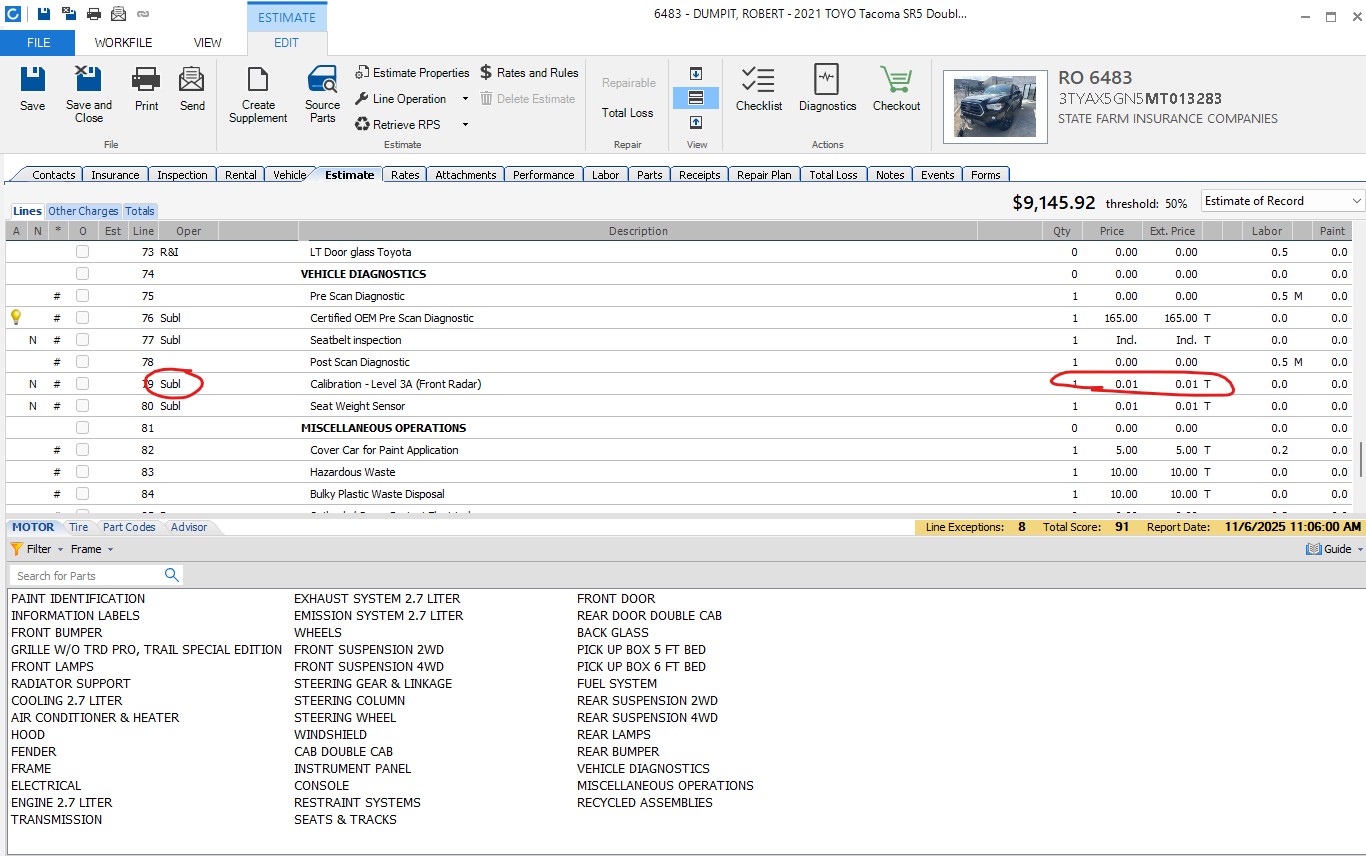
If it isn’t listed as a sublet, we can’t modify it, we can add a new line. (an example of this is sometimes the Estimators have to put a PreScan as Mechanical for insurance. We don’t change it, we can put in a new Sublet line that we will address below).
If it is there and listed as a sublet, but has a $0.00 price, it wont show up on the parts tab because there is no price. When we put in the price on the estimate, we always put it as $0.01. Once you put that and it is already a sublet, save the estimate and go back to the parts tab to make sure it was updated and showing up. (If you updated the estimate and saved it and it’s still not showing up, there may be a problem with the Estimate Line Mapping in the profile. Please check with the Estimator for this.)
If the item is not there at all, we double check on the Invoices to make sure that the Estimator Requested the service. If the estimator Requested the service of Techmotive, we can add it. If the Estimator didn’t request the service we need to check with the Estimator to see if it’s proper to include it.
If the Estimator requested it, put the cursor on the line where you want the new item to be (usually will be in the Diagnostics section, though for an alignment it’d be in the tires section) as it needs to be in the right section and click, then in the bottom half of the window, select the tab Part Codes. This will bring you to the section that’s easy to enter into the estimate. Scroll down to find the right code you want to add, and double click on it. Doing it this way, it will automatically put it in the right section, and if you had previously clicked in that section, it’ll put it above the line you had clicked. Once you’ve added the line you need to verify that it is a sublet (since we’re adding it now, this one we can change) and that the price is set to $0.01. Sometimes the price is listed as one penny and sometimes it’s not, but when we add this way, we always put it as one penny.
Now, any time we make any changes to the Estimate, we must click Save so that it will show up in the Parts tab. you can go back to the parts tab to make sure that the item is there. if it’s there, close this window and return to your posting process.
If, it wont let you change the price or enter a new item it usually means that the invoice is locked. To be able to make any changes or additions we would need to create a suppliment. Before we can make a suppliment we need to check first which Insurance Company is listed, if it’s State Farm, then we must wait at least 24 hours to create a supplement. If the insurance company is USAA, we need to check the notes to see if USAA Approved the Estimate or Suppliment then we can make a new suppliment.
To check to see when a Estimate (or Suppliment) was locked, click on the Events Tab, and we are looking for a line item saying that the Estimate or Suppliment was put in the Outbox. That’s when it was locked and if State Farm, then 24 hours later the Suppliment can be created.
To check if USAA approved the Estimate or Suppliment, go to the Notes tab and look for something like this from Insurance, where it says Approve.
