


Thank you for taking the initiative to add the items so it helps keep some of the pressure off of the Estimators and other Admin staff.
There are a few things to check going forward. First, since the item isn’t in the Parts tab, we go to the Estimate tab and see if it’s there. If it is listed on the Estimate tab, we need to make sure that it is listed as a sublet and has a price.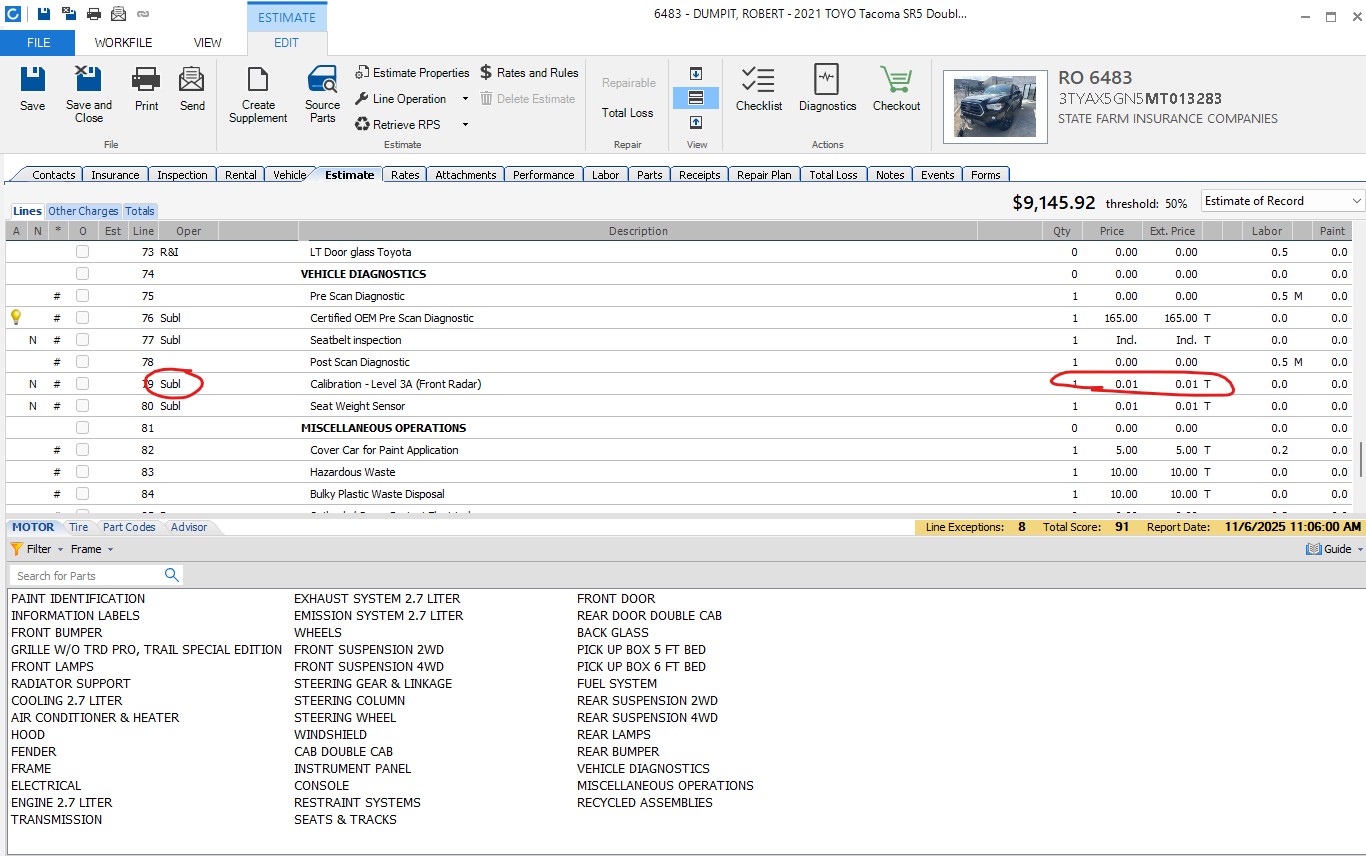
If it isn’t listed as a sublet, we can’t modify it, we can add a new line. (an example of this is sometimes the Estimators have to put a PreScan as Mechanical for insurance. We don’t change it, we can put in a new Sublet line that we will address below).
If it is there and listed as a sublet, but has a $0.00 price, it wont show up on the parts tab because there is no price. When we put in the price on the estimate, we always put it as $0.01. Once you put that and it is already a sublet, save the estimate and go back to the parts tab to make sure it was updated and showing up. (If you updated the estimate and saved it and it’s still not showing up, there may be a problem with the Estimate Line Mapping in the profile. Please check with the Estimator for this.)
If the item is not there at all, we double check on the Invoices to make sure that the Estimator Requested the service. If the estimator Requested the service of Techmotive, we can add it. If the Estimator didn’t request the service we need to check with the Estimator to see if it’s proper to include it.
If the Estimator requested it, put the cursor on the line where you want the new item to be (usually will be in the Diagnostics section, though for an alignment it’d be in the tires section) as it needs to be in the right section and click, then in the bottom half of the window, select the tab Part Codes. This will bring you to the section that’s easy to enter into the estimate. Scroll down to find the right code you want to add, and double click on it. Doing it this way, it will automatically put it in the right section, and if you had previously clicked in that section, it’ll put it above the line you had clicked. Once you’ve added the line you need to verify that it is a sublet (since we’re adding it now, this one we can change) and that the price is set to $0.01. Sometimes the price is listed as one penny and sometimes it’s not, but when we add this way, we always put it as one penny.
Now, any time we make any changes to the Estimate, we must click Save so that it will show up in the Parts tab. you can go back to the parts tab to make sure that the item is there. if it’s there, close this window and return to your posting process.
If, it wont let you change the price or enter a new item it usually means that the invoice is locked. To be able to make any changes or additions we would need to create a suppliment. Before we can make a suppliment we need to check first which Insurance Company is listed, if it’s State Farm, then we must wait at least 24 hours to create a supplement. If the insurance company is USAA, we need to check the notes to see if USAA Approved the Estimate or Suppliment then we can make a new suppliment.
To check to see when a Estimate (or Suppliment) was locked, click on the Events Tab, and we are looking for a line item saying that the Estimate or Suppliment was put in the Outbox. That’s when it was locked and if State Farm, then 24 hours later the Suppliment can be created.
To check if USAA approved the Estimate or Suppliment, go to the Notes tab and look for something like this from Insurance, where it says Approve.
